

 Table of Contents
Bring simplicity to your field service operations.
Our list of integrations is updated frequently. Explore each integration in its own separate page for more information.
Managing remote field teams is not the same as managing office staff who work from home. Field technicians work at customer sites, often in harsh or high-risk settings. They deal with weak signal coverage, urgent repairs, and jobs that need proof of completion on site.
Managers face a hard task. They must keep teams aligned without seeing them in person each day. They also need clear insight into job progress, work quality, and customer issues without slowing technicians down.
Strong remote field team management depends on clear systems. The goal is to build visibility, trust, and control into the daily workflow instead of reacting to problems after they happen.
Managers need to know where jobs stand at all times. They must see if technicians are on site, delayed, or moving between jobs.
Too much tracking creates distrust. Good field team management software gives visibility through work updates instead of constant monitoring. Job status updates, location data, and task progress become part of the work order flow itself.
Field technicians cannot stop mid-task to answer calls or reply to messages. Many jobs involve live systems, heavy tools, or customer interaction.
Communication should stay tied to the work order. Notes, photos, and updates should sit inside the job record instead of scattered across chats or emails.
Managers cannot stand beside every technician during a repair or inspection. They need proof that work meets company standards.
Digital photos, checklists, customer signatures, and technician notes create that proof. Without these records, managers rely only on verbal updates.
Remote technicians need freedom to solve problems on site. They also need clear rules for what counts as a finished job.
Outcome-based management works best. Technicians stay responsible for completed work, logged parts, signed forms, and customer results instead of constant activity checks.
Many delays begin before the technician even arrives on site. Missing details force technicians to call the office or return later.
Each work order should include the full job scope, customer details, access notes, asset history, required parts, and safety rules. When technicians have all the facts up front, they can solve more issues on their own.
Frequent check-in calls waste time for both managers and technicians. They also break focus during field work.
A live scheduling dashboard gives managers a clear view of each job stage. Technicians update status as work progresses, such as accepted, en route, on site, or complete.
Managers can then spot delays early and step in before service targets fail.
Remote teams need clear standards for what “done” means. Without them, each technician may follow a different process.
Digital checklists solve this issue. A technician follows a set flow for each task, such as inspection, testing, readings, photos, and customer sign-off.
This creates steady work quality across the whole team. It also builds a strong audit trail for disputes or compliance checks.
Office-style communication rarely works for field teams. Long meetings and constant messages slow work down.
A better approach keeps communication short and useful. Managers can send brief job updates at the start of the day through a mobile app. At the end of the day, they can review finished work orders and flag any issues.
Weekly team sessions should focus on feedback and field problems instead of admin updates.
Managers should focus on results instead of movement. GPS tracking alone does not show work quality.
Useful field service team management metrics include first-time fix rate, SLA compliance, customer scores, parts accuracy, and job duration against estimates. These numbers show how well technicians perform without creating a culture of distrust.
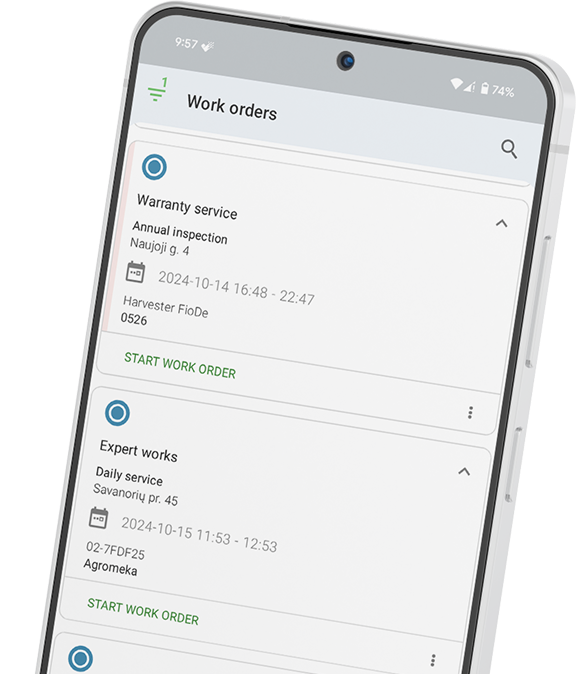
The mobile app becomes the technician’s main work tool. It handles job assignments, asset history, work updates, part logging, photos, and signatures.
If the app feels slow or hard to use, technicians will return to calls and paper notes.
Managers need a live view of all jobs and technicians. A scheduling board helps dispatchers react fast to delays, urgent tasks, or workload gaps.
This improves planning throughout the day instead of after problems grow.
Digital checklists help teams follow the same work standard every time. They guide technicians through required steps and reduce missed tasks.
They also create a clear record of completed work.
Manual reporting takes time and often leads to bad data. Automated reports pull information straight from completed work orders.
Managers can then track utilisation, first-time fix rate, SLA results, and other key metrics without extra admin work.
Frontu helps companies manage dispersed field workforce operations with a mobile-first FSM platform built for real field conditions.
The platform gives technicians a mobile app that works offline and supports one-hand use on site. Technicians can access work orders, update status, capture photos, log parts, and complete digital checklists from the field.
Managers gain live visibility into job progress and technician status through a real-time scheduling board. GPS-based location data supports planning without creating a heavy surveillance culture because tracking happens as part of the work process itself.
Frontu also automates reporting for key performance metrics such as first-time fix rate, SLA compliance, and technician utilisation. This helps managers make faster decisions using live operational data instead of manual reports.
See how Frontu keeps your remote field team coordinated and productive. Book a free demo today.
The biggest challenge is maintaining visibility and accountability without micromanagement. Managers need to know job status, technician progress, and service quality without constant calls.
Track outcome-based metrics such as first-time fix rate, SLA compliance, customer satisfaction, and job completion time. FSM systems automate this reporting from live job data.
Technicians should receive the full job scope, customer details, access instructions, asset history, required parts, and site safety requirements before arrival.
Digital checklists create clear completion standards for every technician. They improve consistency, reduce missed steps, and provide proof of completed work.
Yes. Real-time job dashboards and mobile FSM apps replace most routine check-in calls. Managers can monitor progress through live work order updates instead.




Our list of integrations is updated frequently. Explore each integration in its own separate page for more information.
Link copied!
Join 10,000+ FSM leaders. Subscribe to our monthly expert-led newsletter. We find and report on case studies, success stories and playbooks that are working out there right now.