

 Table of Contents
Bring simplicity to your field service operations.
Our list of integrations is updated frequently. Explore each integration in its own separate page for more information.
Field service teams use many terms for the same type of work. One company may say “work order.” Another may say “job order” or “job card.” The mix creates real confusion when teams switch software, hire new staff, or work with outside contractors.
The problem grows when field teams compare FSM platforms. Many systems use different labels for the same workflow. Teams then waste time trying to decode terms instead of improving service operations.
This guide explains what each term means and why the wording differs across industries and regions. It also shows how these terms fit into a modern digital field service workflow.
By the end, you will know when to use each term and what software vendors mean when they use them.
A work order is the most common term in field service and maintenance. It is a formal record that authorises, tracks, and documents a specific piece of work.
Most FSM platforms, CMMS tools, and facility management systems use the term “work order.” The record usually covers the full job cycle from creation to billing.
A work order often includes customer details, asset data, task notes, labour time, parts used, and completion status. Dispatchers, managers, and finance teams all interact with the same record.
The term became the global standard in many field service software platforms. It is especially common in North American service operations.
A job order is very close in meaning to a work order. In many companies, the terms are fully interchangeable.
The term appears more often in manufacturing, production, and some European field service markets. A job order still contains the same core details as a work order.
The record may include customer information, task scope, labour hours, assigned staff, and parts data. In production settings, the term often links more closely to costing and profitability.
Some firms prefer “job order” because it fits their long-standing internal language. Others use it because their ERP or production system adopted the term years ago.
In practical field service use, there is usually no major functional difference between a work order and a job order.
A job card is a technician-facing version of a work order. It is usually shorter and easier to view while working on-site.
Historically, technicians carried paper job cards to customer locations. The card contained the key details needed to complete the task.
A job card often includes customer details, site information, asset history, task instructions, and required parts. It focuses on the work itself rather than office administration.
The term is common in the UK, Ireland, South Africa, and Australia. Trade industries such as HVAC, plumbing, and electrical services use it often.
In modern FSM software, the job card is usually the mobile view of the work order. The system stores one digital record, but the technician sees a simplified version designed for field use.
Work orders and job orders usually cover the full service lifecycle. Teams use them from the first request through completion, reporting, and billing. A job card focuses on field execution and shows only the details a technician needs on-site.
Office teams mainly manage work orders. Dispatchers assign jobs, managers track progress, and finance teams review labour and parts data. Technicians use job cards while performing the work in the field.
Work orders appear across field service, maintenance, and facilities management. Job orders appear more often in manufacturing and production environments. Job cards remain common in trade industries and regional service markets.
Work orders normally contain billing details and labour costs. Job orders often include costing information as well, especially in manufacturing. Job cards may hide customer pricing and focus only on operational details.
Modern FSM systems treat all three as versions of the same digital record. The office sees the full work order, while the technician sees the mobile job card.
The terminology comes from different industry traditions. Work orders grew from early maintenance and engineering operations during the industrial era.
Factories and maintenance shops needed formal documents to approve and track internal work. The term “work order” became the standard label for that process.
Job orders developed along a similar path in manufacturing. Production teams used them to track labour, materials, and costs tied to specific items or production runs.
Job cards came from trade industries in the UK and other Commonwealth markets. Technicians carried small paper cards to customer sites because larger records were hard to manage in the field.
The physical format shaped the language. Teams referred to the document as a card because it was compact, portable, and easy to update during the job.
Digital field service software later merged these workflows into a single system. The software structure became more consistent, but the terminology stayed fragmented across regions and industries.
Today, most FSM platforms use “work order” because it is widely recognised across international markets. Even so, many companies still prefer older terms that match their trade background or internal culture.
Modern FSM platforms combine all three concepts into one connected workflow. The system stores a single digital record from the first request to the final invoice.
The work order acts as the main operational record. Dispatchers create it, managers schedule it, and finance teams use it for reporting and billing.
The technician sees the same record through a mobile-friendly layout. This is the digital job card.
The mobile view highlights the details needed in the field. It shows the customer address, job notes, asset details, and required tasks without cluttering the screen with admin fields.
In most FSM software, a job order simply means the same thing as a work order. The difference usually reflects naming preference rather than technical design.
Understanding this mapping helps operations teams compare software platforms with less confusion. Different vendors may use different labels, but the underlying workflow often works in the same way.
Your team should use the term that fits your industry and internal workflow. Consistency matters more than chasing a universal standard.
If your software platform uses “work order,” keep using that term across your organisation. Shared language improves training, reporting, and daily communication.
Trade-based teams may prefer “job card” because the term feels more natural in field operations. Manufacturing firms may continue using “job order” because it aligns with existing ERP processes.
The key point is clarity. Everyone should understand what the document represents and how it moves through the service workflow.
The record must contain all details needed to plan, complete, document, and close the job properly. The label itself matters far less than the quality of the process behind it.
Frontu uses “work order” as its standard term because it aligns with global FSM conventions. At the same time, the platform presents technician-friendly mobile views that function as digital job cards.
In Frontu, the work order acts as the core operational record for the entire service process. The workflow starts with a customer request and ends with a completed and billed job.
Dispatchers manage scheduling, assignment, and progress tracking through the full work order view. Managers can monitor technician activity, job status, and service quality from one place.
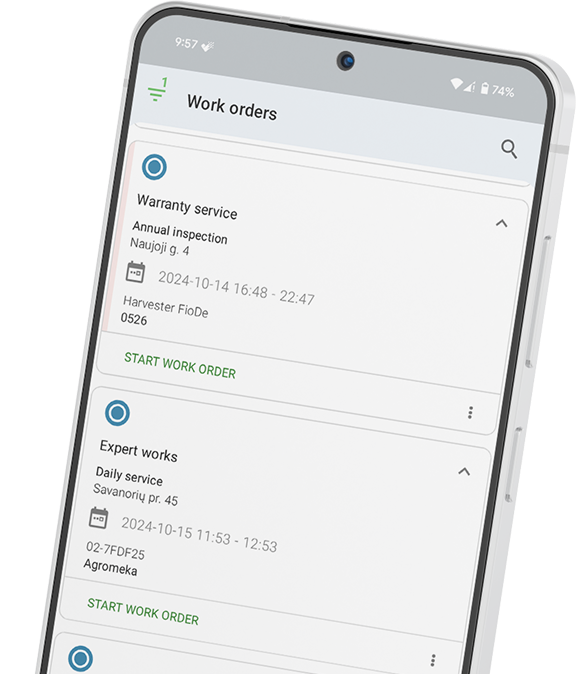
Technicians access the same record through the Frontu mobile app. The app presents the work order as a compact, field-ready job card designed for fast use on-site.
The mobile view keeps the most useful details easy to access. Technicians can review task notes, update job progress, log labour, add parts, and capture customer signatures in real time.
Regardless of the terminology your team prefers, Frontu manages the full service lifecycle within one connected workflow.
See how Frontu’s work order workflow works for your team and book a free demo.
There is very little functional difference between the two terms. Both describe a formal record used to authorise, track, and document a specific job.
“Work order” is more common in FSM software and North American field service. “Job order” appears more often in manufacturing and some European markets.
A job card is a technician-facing work record used during field execution. It started as a physical paper card carried to customer sites.
Modern FSM software usually treats the job card as the mobile view of the work order.
They refer to the same underlying record from different perspectives. The work order contains the full operational and billing information.
The job card focuses on the details technicians need while performing the work in the field.
Most international FSM platforms use “work order” as the standard term. “Job card” appears more often in UK and Australian trade software.
“Job order” is more common in manufacturing and production planning systems.
Consistency inside your organisation matters most. Different industries and software vendors use different terms for similar workflows.
Teams should focus on shared understanding rather than trying to force one universal label.




Our list of integrations is updated frequently. Explore each integration in its own separate page for more information.
Link copied!
Join 10,000+ FSM leaders. Subscribe to our monthly expert-led newsletter. We find and report on case studies, success stories and playbooks that are working out there right now.