Best Mobile Work Order Management Software: Top 10 Picks for Field Service Teams
Author: Lina Banaitytė | 9 März, 2026
Field service operations rarely fail because technicians lack technical knowledge. More often, problems start with coordination. Lost paperwork, unclear instructions, duplicated jobs, and delayed reporting can quietly drain productivity from an otherwise capable workforce.
Mobile work order management software addresses this operational gap. By placing the entire workflow into the hands of technicians through a mobile device, businesses reduce manual administration, eliminate delays in communication, and gain real time visibility into field activity.
Modern platforms go beyond simple task lists. They synchronise job data instantly, attach photos and signatures to completed work, automate dispatching, and connect directly with accounting or ERP systems. The result is a continuous operational loop where field data flows directly into business decision making.
Below is a detailed look at ten work order management platforms widely used across field service industries.
The goal is simple: identify the solutions that genuinely improve technician productivity rather than simply digitise paperwork.
Frontu is designed around a principle that many enterprise systems overlook. Field software must serve technicians first, not office administrators.
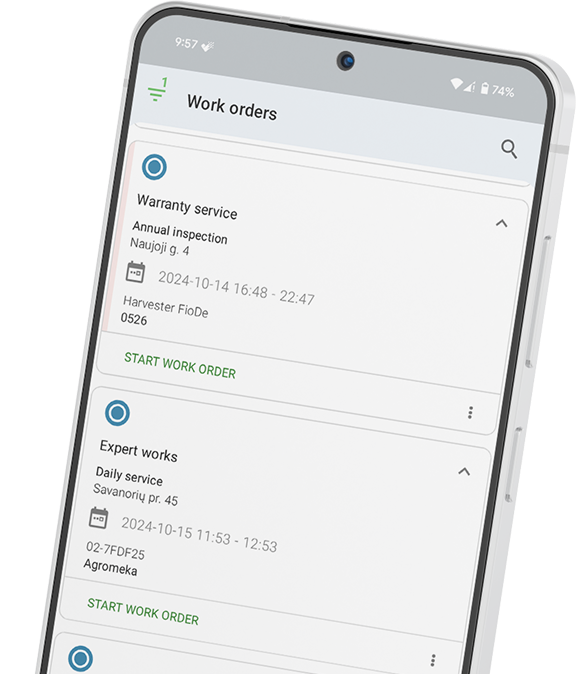
The platform was built as a mobile first system that places operational tools directly in the hands of technicians working on site. Instead of complex menus or overloaded dashboards, Frontu focuses on clarity and usability inside the mobile interface.
Technicians receive jobs through the mobile application where every work order contains structured instructions, customer details, task checklists, and attachments such as manuals or equipment specifications. Updates appear instantly across the organisation thanks to real time synchronisation.
The interface is designed specifically for technicians who may be wearing gloves, working outdoors, or operating in difficult conditions. Navigation is straightforward and tasks can be completed quickly without navigating through complicated workflows.
This design philosophy significantly improves adoption among field teams, which is often the biggest barrier when organisations introduce new software.
Field technicians frequently operate in remote areas with poor connectivity. Frontu addresses this through a robust offline mode.
Technicians can complete jobs, attach photos, capture signatures, and update forms without internet access. Once connectivity returns, the data synchronises automatically with the central system. This ensures no information is lost and eliminates the need for technicians to recreate job reports later.
Workflows vary widely across industries. HVAC service teams require different documentation than heavy equipment technicians or facility maintenance staff.
Frontu allows businesses to customise digital checklists, inspection forms, and work order templates. These forms can include conditional logic, mandatory steps, photo attachments, and signature capture.
The result is a structured workflow that ensures technicians follow consistent procedures while also capturing detailed service data.
Field operations rarely operate in isolation. Work orders often need to feed directly into invoicing systems, inventory platforms, or enterprise resource planning software.
Frontu connects with existing business systems through API integrations. This creates a unified operational environment where data flows from the field directly into finance, reporting, and analytics tools.
For organisations seeking a unified solution, the full capabilities can be explored through Frontu’s Field Service Management software platform.
MaintainX has gained popularity among internal maintenance teams that need a straightforward digital solution without heavy configuration.
The platform focuses on simplifying communication between technicians and supervisors. Work orders are created quickly and assigned through a clean interface that resembles modern messaging applications.
One of MaintainX’s strengths is its built in collaboration features. Technicians can comment on tasks, share updates, and attach photos directly within the work order. This reduces the need for separate communication tools and keeps operational conversations attached to the relevant job.
MaintainX is often adopted by manufacturing plants, hospitality facilities, and operations teams managing internal assets.
Jobber is widely used by small to medium residential service companies such as plumbers, landscapers, cleaning services, and electricians.
The platform focuses heavily on the customer interaction side of service management. Businesses can create quotes, schedule visits, track jobs, and generate invoices within a single workflow.
One of Jobber’s standout features is its client hub. Customers can review quotes, approve work, track appointment details, and pay invoices through an online portal.
For residential businesses where customer experience plays a major role in retention and referrals, this client facing functionality provides significant value.
ServiceTitan is one of the most recognised platforms within the HVAC and plumbing sectors. It offers an extensive suite of features designed for large service organisations managing complex operations.
The platform includes advanced scheduling tools, technician performance tracking, inventory management, and detailed financial reporting. Dispatchers gain deep visibility into technician availability, job status, and route planning.
However, this level of functionality comes with a learning curve. Implementing ServiceTitan typically requires a structured onboarding process and dedicated administrative management.
For large commercial service providers, the platform can deliver powerful operational insights. Smaller companies may find it more complex than necessary.
Housecall Pro is another solution commonly adopted by residential service businesses seeking fast deployment and easy onboarding.
The platform allows companies to manage scheduling, dispatching, customer communication, and invoicing within a single mobile friendly system.
Technicians receive work orders through the mobile application and can update job progress, capture photos, and collect customer signatures on site.
One of the reasons Housecall Pro remains popular is its short implementation time. Many small service businesses can begin using the system within a few days.
UpKeep focuses strongly on asset management and preventive maintenance scheduling. It is often used in industries where equipment reliability is critical.
Maintenance teams use the platform to track asset history, schedule routine inspections, and monitor repair activity across facilities.
Each asset can have its own maintenance schedule, service records, manuals, and parts inventory associated with it. This centralised asset visibility helps maintenance managers plan interventions before equipment failures occur.
UpKeep is particularly popular within manufacturing, utilities, and logistics environments where asset uptime directly affects operational performance.
Zuper is designed for organisations that manage complex scheduling requirements involving multiple technicians, service locations, and job priorities.
The platform provides advanced dispatching tools that help managers allocate resources efficiently across large service regions. Automated scheduling rules allow businesses to assign technicians based on skill sets, certifications, or proximity to the job location.
Zuper also integrates with several CRM platforms, allowing customer data and service history to flow directly into work order planning.
For companies that rely heavily on dynamic scheduling and service routing, these capabilities can significantly improve operational coordination.
Fiix operates within the CMMS category and is designed primarily for maintenance teams managing equipment intensive operations.
The platform collects operational data from work orders, asset inspections, and maintenance logs. Over time, this information provides insights into equipment reliability and maintenance patterns.
Maintenance managers can analyse recurring failures, identify assets that require frequent servicing, and adjust preventive maintenance schedules accordingly.
This data driven approach helps organisations reduce unexpected equipment downtime and optimise long term maintenance planning.
Limble CMMS has built a reputation around usability. Many maintenance systems are powerful but difficult to adopt. Limble attempts to remove that barrier through a streamlined interface.
Work orders can be created quickly and assigned to technicians through the mobile application. Asset tracking, maintenance scheduling, and reporting tools are available without overwhelming users with complex configuration options.
The platform also provides dashboards that highlight maintenance costs, work order completion rates, and asset performance indicators.
For maintenance teams seeking clear operational visibility without heavy system administration, Limble presents a balanced option.
Coast takes a very different approach compared with most enterprise work order systems.
Instead of offering a large suite of operational features, the platform focuses on simplicity. Teams can create work orders, communicate about tasks, and track completion status within a chat style interface.
This lightweight structure makes Coast particularly appealing for smaller teams that need basic coordination tools rather than full scale enterprise functionality.
Organisations that do not require deep reporting, asset management, or integrations may find this approach easier to adopt.
Selecting work order software is less about the number of features and more about how effectively technicians use the system.
Even the most advanced platform fails if field teams avoid using it.
Several evaluation criteria can help organisations make the right choice.
Technician adoption is the most critical factor. Field staff should be able to receive jobs, complete forms, and report results without lengthy training.
If technicians struggle to navigate the mobile application, the system will likely fail regardless of its capabilities.
Connectivity cannot be guaranteed in many field environments. Software that cannot function without internet access forces technicians to delay updates or recreate information later.
Reliable offline functionality ensures that work continues uninterrupted.
Managers need clear insight into field operations. Reporting dashboards should allow supervisors to monitor job completion, technician performance, and operational bottlenecks.
This visibility allows organisations to continuously improve processes.
Many businesses begin with a small field team but expand over time. The selected platform should support this growth without requiring a complete system replacement later.
Software that integrates with accounting systems, ERP platforms, and CRM tools typically scales more effectively.
Field service operations generate a constant stream of operational data. Work orders, inspections, asset reports, and technician notes all contain valuable information.
Paper based systems hide that information inside filing cabinets and disconnected spreadsheets.
Mobile work order management platforms bring this data into a unified operational workflow where technicians, dispatchers, and managers share the same information in real time.
The best solution is rarely the one with the most features. It is the system that technicians actually use during their daily work.
Organisations exploring digital work order management should begin by testing platforms that prioritise usability, mobility, and integration with existing business tools.
Mobile work order management refers to software that allows technicians to receive, update, and complete service jobs directly through a mobile device.
Instead of using paper forms or office based systems, technicians can access job details, record work performed, attach photos, and collect digital signatures while on site.
Many modern platforms include offline functionality. Technicians can continue working even when mobile signal is unavailable.
The application stores data locally and synchronises with the central system once connectivity returns.
Most field service platforms include GPS tracking features that allow dispatchers to see technician locations and optimise routing.
These tools are typically used to improve scheduling efficiency rather than continuously monitor staff movement.
Even small service teams benefit from digital work order systems. The software reduces paperwork, simplifies scheduling, and helps businesses maintain consistent service documentation.
Over time, these improvements save administrative time and reduce operational errors.
CMMS platforms primarily focus on equipment maintenance and asset reliability within facilities.
Field Service Management systems focus on coordinating technicians performing service work across multiple locations, including scheduling, dispatching, and customer communication.
Implementation time varies depending on workflow complexity and system integrations. Many organisations can begin using core features within a short onboarding period once workflows and forms are configured.
Many service platforms provide customer portals or automated notifications that allow clients to see appointment times, technician arrival updates, and job completion information.
This transparency improves customer experience and reduces inbound support enquiries.



Link copied!

 Table of Contents