

 Table of Contents
Bring simplicity to your field service operations.
Our list of integrations is updated frequently. Explore each integration in its own separate page for more information.
A work order is a formal document that tracks a specific job from start to finish. It records who asked for the work, what needs fixing, who will do it, when it should happen, and what the result was.
In field service, the work order sits at the heart of daily operations. Every dispatch, repair, inspection, and invoice starts with one.
Without work orders, teams rely on calls, texts, or verbal updates. That creates missed jobs, weak records, billing gaps, and poor service control.
A clear work order gives both office staff and technicians one source of truth. It keeps jobs traceable, repeatable, and easy to manage at scale.
The process starts when a customer reports a fault or requests service. A work order may also start from a planned maintenance schedule.
The dispatcher creates the work order manually or the FSM system creates it on its own. The record includes customer details, asset data, site location, fault notes, and job priority.
This stage sets the base for the whole job. Poor data at this point often leads to delays and repeat visits.
The dispatcher assigns the job to the right technician. Skills, travel distance, and schedule all affect the choice.
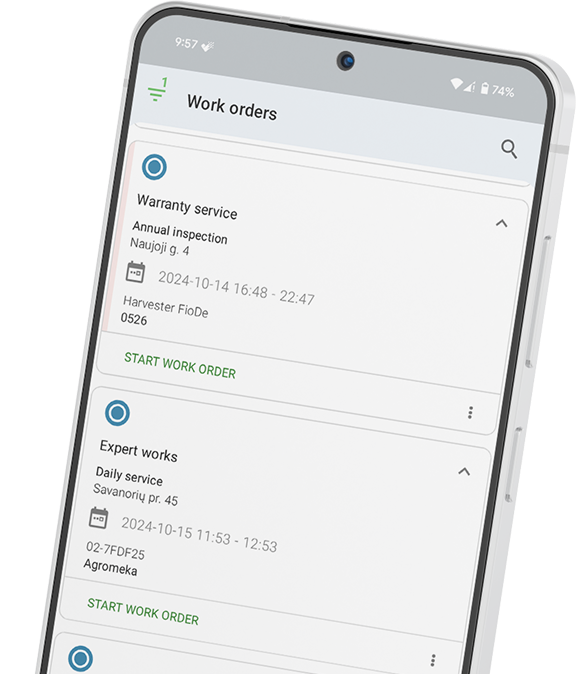
The technician receives the work order through a mobile app. They can view job notes, asset history, checklists, and site details before travel starts.
Fast assignment helps teams meet SLAs and cut idle time.
The technician travels to the site and performs the work. During the visit, they log labour hours, used parts, notes, and proof of work.
Many teams also capture photos before and after the repair. This helps with audits, warranty claims, and customer trust.
The work order becomes a live service record during this stage.
After the job ends, the technician marks the work order complete. The customer signs the record through a mobile device or paper form.
The office can see the status change in real time. Managers no longer need to chase updates by phone.
Clear completion records reduce billing disputes and service gaps.
The finished work order moves into billing. In a digital system, the invoice can generate at once from the job data.
The work order then becomes part of the asset history. Teams can search records by customer, site, asset, technician, or fault type.
Long-term records help with future service planning and trend tracking.
Reactive work orders handle unplanned problems. These jobs start after a fault, breakdown, or customer complaint.
They often carry high urgency and strict response targets. Dispatch speed matters because downtime costs money.
Too many reactive jobs often point to weak preventive maintenance. Emergency fixes usually cost more than planned service visits.
Preventive maintenance work orders support planned servicing. Teams create them at fixed time or usage intervals.
A machine may need service every 90 days or every 500 engine hours. Some systems also trigger work orders from sensor data.
Preventive work helps stop faults before they grow into major failures. It extends asset life and lowers repair costs.
Digital FSM platforms can create these work orders on their own when the interval arrives.
Inspection work orders focus on checks and assessments. Many industries require them for safety or legal compliance.
These jobs often use digital checklists with pass or fail fields. Technicians may also attach photos and signed reports.
Digital records make audits much easier. Paper forms are slow to find, easy to lose, and hard to share.
Installation work orders cover the setup of new systems or equipment. These jobs often need more planning than repairs.
Teams may need to manage stock delivery, site access, and specialist labour. Some projects also require several visits.
The work order tracks what was installed and where it went. Strong records help with future support and warranty work.
Emergency work orders handle urgent safety or failure events. These jobs need an immediate response.
Dispatchers may pause other work to free the right technician. Fast action helps reduce risk and downtime.
Digital FSM systems can flag these jobs as top priority. The alert appears at once on the scheduling board and mobile app.
Paper work orders stay with the technician and offer limited access. Digital work orders stay available on any device with full service history attached.
Paper systems give office teams little live visibility. Digital systems update job status in real time.
Paper records rely on handwriting and manual data entry. Digital systems capture the data once at the point of service.
Paper delays billing because forms must return to the office first. Digital systems can trigger invoices as soon as the technician closes the job.
Paper reporting needs manual data collection. Digital systems build reports from live job data automatically.
Every work order should contain a unique work order number and issue date. It should also include the customer name and site address.
The record must list asset details such as make, model, and serial number. The job description should explain the task clearly and avoid vague wording.
Each work order should show the job priority and assigned technician. It also needs the planned date and time.
The technician should record labour hours and used parts. The final section should include completion notes and customer sign-off.
Some jobs may also require follow-up actions. Missing even one field can create delays, billing issues, or poor service records.
Frontu places work orders at the centre of field service operations. The platform connects the full process from customer request to completed invoice.
Teams can create preventive maintenance work orders automatically. Technicians manage jobs through a mobile-first app with offline support.
Managers gain live visibility into job status and technician progress. Customers can sign work orders digitally at the end of the visit.
The system also helps speed up billing by triggering invoices from completed jobs. This removes manual data transfer and cuts admin work.
See how Frontu manages your work orders end to end and book a free demo.
A work order is a structured document that authorises, tracks, and records a specific job. It captures who requested the work, what needs doing, who completed it, and what the outcome was.
The main types include reactive work orders, preventive maintenance work orders, inspection work orders, installation work orders, and emergency work orders.
Paper work orders rely on manual handling and offer no live visibility. Digital work orders update in real time, support faster billing, and create searchable records.
Dispatchers or office staff usually create work orders after a customer request. Digital FSM systems can also create them automatically for scheduled maintenance.
A work order tracks and authorises the job itself. An invoice charges the customer for the completed work. In digital systems, the finished work order often creates the invoice automatically.




Our list of integrations is updated frequently. Explore each integration in its own separate page for more information.
Link copied!
Join 10,000+ FSM leaders. Subscribe to our monthly expert-led newsletter. We find and report on case studies, success stories and playbooks that are working out there right now.