

 Table of Contents
Bring simplicity to your field service operations.
Our list of integrations is updated frequently. Explore each integration in its own separate page for more information.
Field service management software helps service firms run field work from one system. It manages the full job cycle from the first customer call to the final invoice.
Most field teams still rely on calls, paper sheets, inboxes, and whiteboards. That setup slows teams down and leads to missed jobs, poor updates, and lost data.
FSM software replaces those tools with one shared platform. Office staff and field technicians can both access the same job data in real time.
This guide explains what FSM software does, who needs it, what features matter most, and how to choose the right platform.
FSM software manages each stage of a service job. It keeps jobs moving from request to close without manual handoffs.
A customer request becomes a digital work order. The system stores all key job details in one place.
This replaces sticky notes, phone calls, inbox chains, and paper forms. Teams no longer lose jobs between intake and dispatch.
Dispatchers assign work based on skill, route, and free time. The system shows where technicians are and what jobs they can handle.
This replaces whiteboards and manual spreadsheets. It also cuts double bookings and route waste.
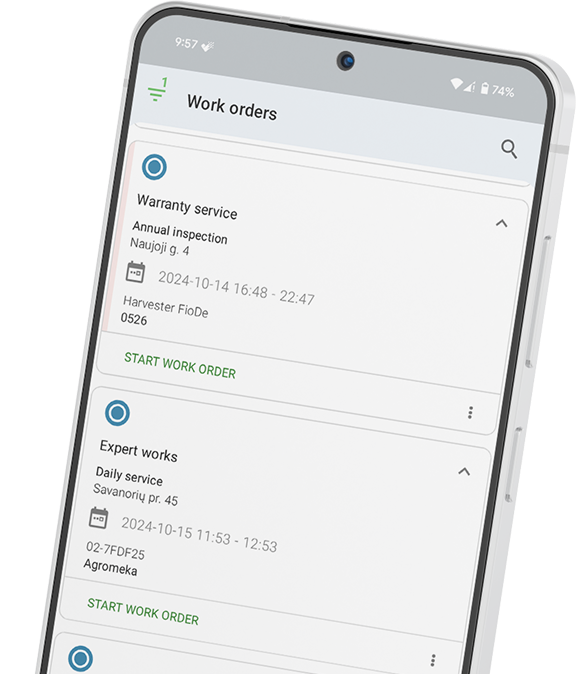
Technicians receive jobs through a mobile app. They can view asset history, add notes, upload photos, and log parts on site.
The app also supports status updates and digital sign-offs. Teams no longer need to return paper forms to the office.
FSM platforms turn job data into live reports. Managers can track fix rates, SLA targets, labour time, and repeat visits.
This replaces manual reports built from paper records and spreadsheets.
Once a technician closes a job, the system can trigger billing. Invoice data flows straight into finance tools.
This removes delays caused by missing forms or manual data entry.
FSM software fits any firm that sends technicians to customer sites. The work may involve repair, setup, checks, or planned service.
Common users include HVAC firms, lift service teams, heavy equipment dealers, and electrical contractors. Plumbing firms, utilities, and facility service teams also rely on FSM platforms.
Vending machine operators and broadband service teams use FSM software as well. Security system installers often need it for job tracking and proof of work.
FSM software works for both small and large teams. Even firms with five technicians face scheduling, reporting, and job tracking issues.
Larger firms need even more structure as job volume grows. Manual systems rarely scale well past a small team.
Work order management sits at the core of every FSM platform. It gives teams one place to create, track, and close jobs.
A strong work order includes the customer name, site details, asset history, and job scope. It also stores parts, checklists, photos, and sign-off data.
Basic job records only show task details. Strong FSM systems add deep job context that helps technicians solve issues faster.
Asset history matters here. A technician should see past repairs, repeat faults, and service notes before arrival.
Scheduling becomes hard once a team grows past a few technicians. Manual planning often leads to delays, gaps, and poor route use.
FSM software gives dispatchers a live scheduling board. Teams can drag jobs between technicians in seconds.
Good systems also match jobs by skill and location. Some platforms suggest the best technician based on travel time and workload.
The best FSM tools react to change in real time. If a job runs long, the platform flags the impact on the next booking.
The mobile app often decides whether an FSM rollout succeeds. Technicians need a tool that feels faster than paper.
The app should work offline in remote areas and large buildings. It should also load fast and support one-tap updates.
Technicians must be able to upload photos, capture signatures, and log parts with ease. Complex forms slow adoption and create poor data.
A good app also presents job details in a clear field-ready view. Technicians should not need extra clicks to find key data.
Good service depends on good updates. Customers want to know when help will arrive and when work is done.
FSM software automates those updates. Customers receive job confirmations, ETA alerts, and completion notices without manual calls.
Some platforms also include customer portals. Clients can track jobs, submit requests, and review service history online.
This matters most for firms with multi-site or enterprise clients. Clear updates reduce support calls and build trust.
FSM reporting shows how well the operation runs. Managers can spot delays, repeat faults, and low job margins faster.
Key metrics include first-time fix rate, mean time to repair, and SLA compliance. Technician use and repeat visit rate also matter.
Strong reports depend on strong field data. Technicians must update jobs in real time for reports to stay useful.
This is why mobile adoption matters so much. Poor field input leads to weak reports and bad decisions.
CMMS software focuses on assets inside one site or facility. Internal maintenance teams use it to manage machines and planned upkeep.
FSM software focuses on field operations. It helps firms dispatch technicians to customer sites and manage service delivery.
The core goal differs between both systems. CMMS improves asset uptime, while FSM improves job execution.
Many modern platforms now combine both functions. Frontu supports asset tracking, planned maintenance, scheduling, and field service workflows in one platform.
The mobile app should be your first test during evaluation. A poor app leads to low technician adoption and weak data quality.
Test the app in real work conditions before you buy. Field technicians should use it during live jobs, not just demos.
Operations teams should control workflows without developer help. Managers must be able to edit forms, checklists, and fields on their own.
Complex setup slows rollout and raises long-term costs.
FSM software should connect with the tools you already use. This includes finance tools, CRM systems, and ERP platforms.
Look for links with systems like QuickBooks, Xero, or SAP. Manual data re-entry wastes time and increases error risk.
Frontu built its platform for field service teams from the ground up. It was not adapted from a generic task tool.
The platform covers the full service lifecycle. Teams can create work orders, dispatch technicians, manage preventive maintenance, and track live job progress.
Frontu also includes a mobile-first technician app with offline support. Technicians can update jobs, log parts, and capture proof of work in the field.
Managers gain access to live dashboards and scheduling tools. Customers receive automatic updates during the service process.
Frontu supports firms across HVAC, heavy equipment, utilities, facility service, and construction equipment sectors. The platform helps both field technicians and office teams stay aligned.
See how Frontu manages your full field service operation and book a free demo today.
Field service management software manages the full lifecycle of a service job. It handles intake, scheduling, field work, reporting, and billing from one system.
HVAC firms, lift service teams, electrical contractors, and heavy equipment dealers use FSM software. Utility firms, plumbers, and facility service teams also rely on it.
CMMS focuses on internal asset maintenance at fixed sites. FSM software focuses on dispatching technicians and managing field operations.
FSM software often delivers value with just three to five technicians. Manual scheduling and paperwork already create cost at that stage.
Most teams can start using Frontu within one to two weeks. The setup process targets non-technical users.
Look for offline support, fast load speed, one-tap updates, photo uploads, digital signatures, and simple parts logging. Always test the app with real technicians before rollout.




Our list of integrations is updated frequently. Explore each integration in its own separate page for more information.
Link copied!
Join 10,000+ FSM leaders. Subscribe to our monthly expert-led newsletter. We find and report on case studies, success stories and playbooks that are working out there right now.