

 Table of Contents
Bring simplicity to your field service operations.
Our list of integrations is updated frequently. Explore each integration in its own separate page for more information.
Field service teams spend too much time fixing communication gaps. Technicians call dispatchers for missing job details. Dispatchers call technicians for status updates. Customers call the office for arrival times.
Most of these calls should never happen.
The root problem is often the same. The work order lacked the right data at the right time.
A strong digital work order does more than assign tasks. It acts as the main link between the office, the technician, and the customer. When teams improve that link, they cut delays, reduce stress, and speed up every job.
Poor communication drains field service profits fast.
Each office call breaks the technician’s focus. The call itself takes time. The reset after the call takes more time. A short interruption can cost up to 25 minutes of productive work.
Now scale that across a full team.
If a 20-person team handles two office calls per job, daily losses grow fast. Each technician may lose close to 40 minutes every day. That can equal one lost job slot per technician.
The damage goes beyond time loss.
Phone calls leave no audit trail. Staff may forget details or repeat them wrong. Managers cannot track who approved what or when the decision happened. That creates risk for billing, compliance, and customer disputes.
Many firms still treat work orders as simple task lists. That view limits their value.
A digital work order should act as a full communication system.
It gives technicians clear job instructions, asset data, parts lists, and safety steps. It gives dispatchers live status updates without extra calls. It gives customers arrival updates and job summaries. It gives managers a full record of labour, parts, costs, and approvals.
When all communication lives inside the work order, teams stop relying on reactive calls and scattered messages.
Most costly communication failures happen before the technician reaches the site.
A vague job brief creates delays from the start. Technicians lose time asking basic questions or driving without the right parts.
Each work order should act as a complete job briefing.
The work order should include a full fault description, not vague notes like “check boiler.” It should include customer details, access codes, asset history, past faults, needed parts, and site safety rules.
This level of detail improves first-time fix rates and reduces office calls.
Manual preparation makes this hard at scale. Modern field service management platforms solve this by pulling asset records and parts templates into the work order automatically.
Dispatchers need job visibility during the day. Technicians need time to focus on repairs.
Phone calls solve the first problem while creating the second.
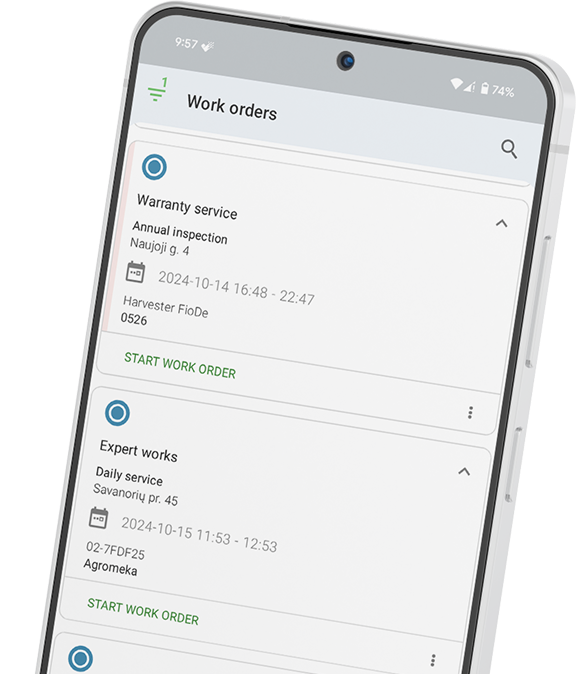
Real-time status updates remove the need for routine check-in calls. The technician updates the job status through the mobile app. The dispatcher sees progress live on the dashboard.
Simple updates like “en route,” “arrived,” “job started,” or “parts needed” give the office full visibility.
This changes dispatcher calls from routine interruptions into real problem-solving conversations.
Unexpected work appears often in field service.
In paper-based systems, technicians stop work and call the office. Managers review the issue over the phone. Customers may wait for approval. Everyone loses time.
Digital work orders handle this far better.
The technician logs the issue in the work order, adds photos, and flags the job for review. Managers review the request from their phone or laptop. The technician keeps working on approved tasks while the request moves through the system.
Digital approval flows remove long waits and reduce confusion.
Post-job communication shapes both customer trust and cash flow.
A good digital work order triggers automatic updates when the technician closes the job.
The customer receives a job summary with completed work, used parts, and technician sign-off. The system can also send a feedback request. At the same time, billing workflows can start at once.
These steps happen without office staff chasing paperwork or making manual calls.
Managers also gain a timestamped record of job completion. That removes the need for end-of-day verbal updates.
Generic notes create confusion.
Replace “repair AC unit” with detailed fault descriptions. Include the asset model, site location, and known issue. Clear job notes reduce pre-job calls fast.
Past repairs help technicians diagnose faults quicker.
When technicians see earlier service visits, they ask fewer questions and avoid repeat mistakes.
Real-time visibility should not depend on habit.
Configure the system to require updates when technicians arrive on-site and begin work. This keeps dispatchers informed without extra calls.
Teams need clear rules for unexpected work.
Instead of telling technicians to “call the office,” define approval steps inside the work order. Specify who approves added costs or scope changes.
Customers want updates without chasing the office.
Automatic ETA alerts and job progress updates improve trust and reduce inbound calls. Simple notifications often create the biggest customer service gains.
Frontu treats the work order as a communication system, not just a task record.
The platform pre-fills job briefs with asset history and service data. Dispatchers see real-time technician status updates on one dashboard. Managers approve scope changes through digital workflows without phone calls or delays.
Frontu also automates customer notifications at key job stages. Teams can send digital completion summaries and trigger invoices with one action.
These workflows reduce reactive communication and keep field teams focused on productive work.
See how Frontu turns your work orders into a communication system and book a free demo.
The work order acts as the main link between the office, the technician, and the customer. Weak work orders create information gaps that teams fill with reactive calls and manual updates.
Each work order should include a detailed job description, customer details, site access notes, asset history, needed parts, safety steps, and clear approval rules.
They remove routine check-in calls. Dispatchers can track job progress live as technicians update work order status through the mobile app.
Digital work orders send automatic updates when the technician is assigned, travelling, or finished with the job. Customers stay informed without calling the office.
Yes. Better job descriptions, attached asset history, and clear escalation rules can improve communication even inside older systems.




Our list of integrations is updated frequently. Explore each integration in its own separate page for more information.
Link copied!
Join 10,000+ FSM leaders. Subscribe to our monthly expert-led newsletter. We find and report on case studies, success stories and playbooks that are working out there right now.